
1. Send Now – Trigger Your Alert Email On Demand
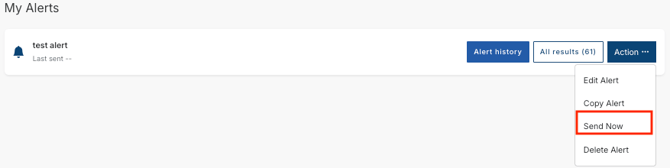
By default, tender alert emails begin sending from 4:00 pm (AWST) each day. With the new Send Now feature, you can trigger an immediate alert email at any time of day, without waiting for the scheduled send.
After clicking Send Now, you will only receive a further email after 4:00 pm if new tenders have been added or existing tenders have been updated since you last triggered a send.
How to Use Send Now
- Select
 from the top right corner of the home page
 - Clicks ALERTS from the main menu
- Click Actions next to the relevant alert
- Select Send Now
Your alert will now only return tenders from the Issuers you have selected.
2. Search by Issuer Name
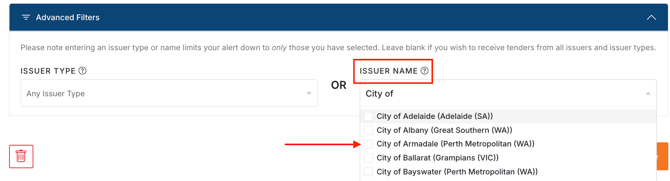
You can now filter your alert to only return tenders from specific Issuers using the Issuer Name option found within Advanced Filters.
Within Advanced Filters, you can refine your alert using either Issuer Type or Issuer Name. These two options cannot be used together, as the Issuer Type on record may not match the Issuer Name you select.
Example: If you select an Issuer Type of "School" and an Issuer Name of "City of Fremantle", the alert results would be incorrect because the City of Fremantle is classified under the Issuer Type "Local Government", not "School".
If you do not need to filter by Issuer Type or Issuer Name, you can leave these fields blank.
How to Filter by Issuer Name
-
Open the relevant alert and navigate to Advanced Filters

-
Under Issuer Name, select the desired Issuer(s) from the drop-down list (If duplicate Issuer names appear in the list, select all that apply
-
Click Save
Your alert will now only return tenders from the Issuers you have selected.
Need a little help?
Just email us at support@australiantenders.com.au or call our friendly Australian support team on 1800 934 117.