
Not only do we consolidate notices of every single tender from private and public buyers, but you can also set up a daily tender alert to be notified via email when tenders are published that match your search criteria. (see How to Set Up Tender Alerts)
Categories
Categories are the most reliable way to capture relevant tenders; if you can find a category match for your services, we always recommend using that instead of keywords, as our team is highly effective at categorising tenders when they are added.
Are you unsure if there's a category for you? This document may help, or you can contact our Support Team, who will be more than happy to help.
As a subscriber, your dedicated account manager will work on your behalf to set up the most effective tender alert for your business.
- You can further refine the alert to have a combination of keywords and categories or just keywords. (see keywords)
- If you don't select any categories, the system will search across ALL categories
Titles, Regions & Additional Users
- Additional users can have different alerts or the same alerts as the main account holder (see Alerts for Users)
-
Not sure what to include as your tender alert title? Don't worry, this is just for you. It's a way for you to identify which alert is delivered to your inbox. For example, you may have one alert titled Construction Tenders and another titled Engineering Tenders to differentiate them.
- Our region selections are based on the State Government region identification. You can select as many regions as match your subscription plan.
Keywords
Keywords are a fantastic way of searching for specific types of tenders. However, you have to make sure you understand the way it functions. We've broken it down for you below:
- Maximum of 250 characters
- Special characters such as quotation marks and the asterisk are not allowed, as they do not function as they would in other search engines.
- Add plural and singular (especially where the spelling differs!), for example
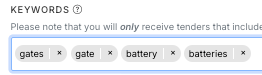
- If you use keywords, we recommend limiting the search across relevant categories. A keyword search using the example above would be best limited to the category "Electrical Systems & Lighting & Equipment & Services" and "Gates"
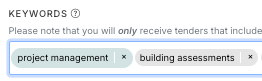
- By default, our search engine matches any of the words entered. If you want to search for an exact phrase, type it in and press enter to confirm it as its own bubble before adding anything else. For example: "Project Management"
Advanced Filters
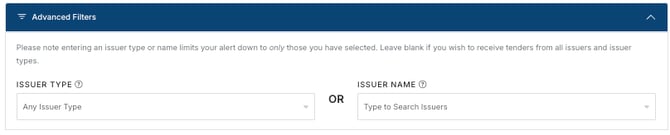
In this section, you can further refine your alert to receive tenders from a specific Issuer Type or Issuer Name. You cannot choose both, as the Issuer Type may not match the Issuer Name. For example, if you select an Issuer Type of "School" and an Issuer Name of "City of Fremantle", the Issuer Type for the City of Fremantle is actually "Local Government", so your alert results would be incorrect.
Issuer Type
If you want your search limited to schools or local government, select this in the issuer type field. If you want to see tenders from all types of issuers, leave this field blank.
Issuer Name
If you only want to see tenders from specific issuers, you can select these from the drop-down list. If there are duplicate issuer names in the list, select all that apply.Don't forget to click save/update, or your alert edits will not be saved
Please Note
Tender Alerts are sent out at the end of each day. Only those published or updated that day are sent, so no alert means no new/updated tenders for that day.
Need a little help?
Just email us at support@australiantenders.com.au or call our friendly Australian support team on 1800 934 117.